Canine Echo Simulator: New Heart Valves & Probe Controls
We first built our canine echocardiography simulator over a decade ago, and we're glad it's given so many budding echocardiographers a head start on the relationship between the probe and the heart. 🫀 Now it's had some much-needed improvements, and we think you'll notice the difference the moment you open it. Here's what's new, and why each change matters when you're scanning a real patient.
A new heart model, now with valves
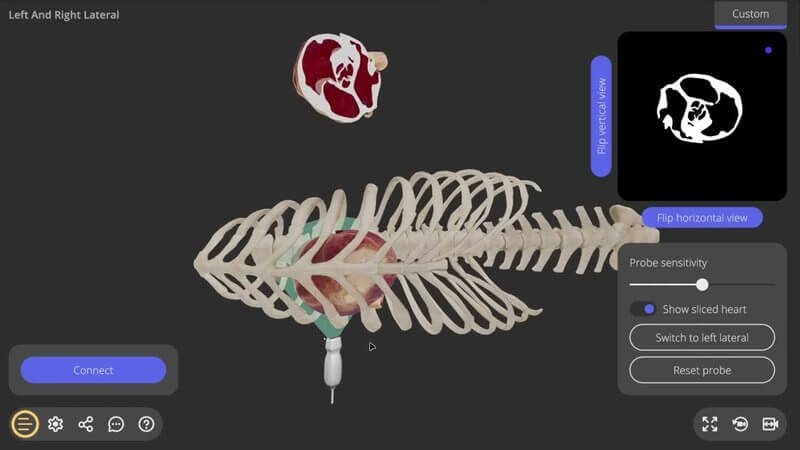
The first thing you'll see is a new heart model. Yes, it looks prettier, but the real win is that it now has valves. The old model didn't, and that was a big drawback, because the valves are one of the most important structures to assess during an echo.
Hide the slice for a truer echo experience 🙈
Want a challenge? Turn off the slice option at the top to hide the sliced heart. You won't be able to see which slice of the heart you're taking, which is much closer to the real echo experience.
Starting where you'd really place the probe
We've moved the probe's starting position to the punctum maximum of the mitral valve. That's where you'd palpate the strongest heartbeat on your patient, and it's a typical starting point for probe placement. We've also adjusted the default view of the scene, so it looks more like you're sitting at the table in front of your patient.
Fanning around your thumb, not the probe head 👍
This is the big one. Before, the probe rotated around its own long axis. Now it rotates around an offset point marked by a button, which you can think of as your thumb on the probe. That's how echocardiographers actually move the probe: more of a fanning motion with the thumb as the pivot than a strict rotation.
Finding the 3 key views in right lateral recumbency
With just small fanning and tilting movements, you can now reach the standard short- and long-axis planes in right lateral recumbency, including the pulmonary arterial outflow view. Want to jump straight in? Use the WASD keys and see if you can find the 3 key views echocardiographers look for in canine patients. 🎯
Smaller tweaks and what's next
- The ultrasound screen's default view now matches real life, with the probe "button" shown in the top-right corner.
- The left lateral recumbency view still works, but it isn't optimised for the new probe setup yet.
- Next on our list: using your mobile phone to simulate the ultrasound probe, improving the left lateral view, visualising the anatomy of the heart, and more.
Tell us what you think
We'd love for you to play with it, enjoy it, and then tell us how it went. The quickest way is the send feedback button inside the simulator. 💬 Curious about the rest of our 3D veterinary anatomy? Have a look at our 3D content.
Canine echocardiography simulator FAQ
What's new in this update?
A new heart model with valves, the option to hide the sliced heart, a more realistic probe starting position and scene view, a probe that fans around your "thumb" rather than its own axis, and an ultrasound screen with the probe button in the top-right corner, just like real life. 🫀
Where does the probe start?
At the punctum maximum of the mitral valve: the point of the strongest heartbeat, where you'd palpate your patient and typically place the probe.
Which views can I practise?
In right lateral recumbency you can find the 3 key views (short axis, long axis and the pulmonary arterial outflow view) with small fanning and tilting movements. Left lateral is available too, though it isn't optimised for the new probe setup yet.
Explore more
FREE for veterinary students, interns, residents & academics at vin.com. Also available by subscription at ivalalearn.com
Want to understand more about the options for accessing the content? Our company FAQs have the answers here pricing, account access and billing.