How to Use the New IVALA 3D Interface
Over the coming weeks we rolled out a new IVALA 3D interface. Interacting with the content itself hasn't changed - we're not re-covering every mouse move here - but the menus got a clearer coat of paint. 🎨 Note from the video description: this walkthrough is now outdated in places as the UI keeps evolving, but the ideas below still map to how we think about the viewer.
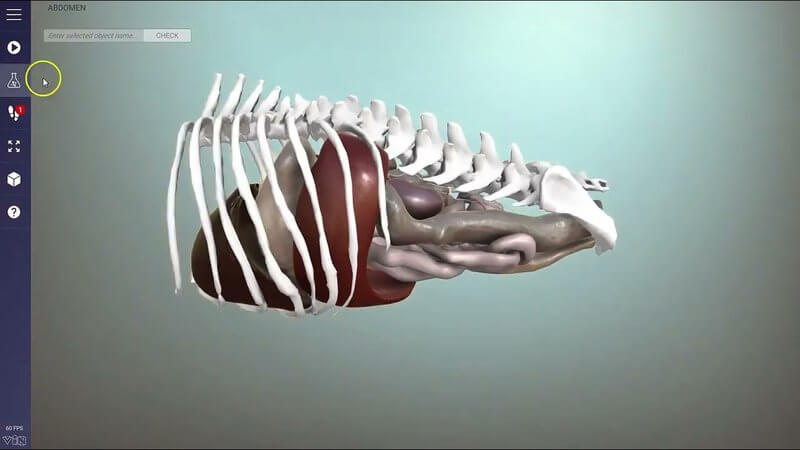
Right menu: objects, hide/show and search
The right menu lists all interactable objects. Show and hide them by clicking names, or use the top buttons to hide all and show all. Above that, a search bar lets you type something, find it and highlight it.
Left menu: more scenes, play and Test Yourself
This is where we changed the most. People often missed that the old menu icon was a portal to more 3D content, so we added a notification with a number when more scenes are available - for example switching into a radiography scene.
- Play runs animations in the scene when they're available.
- Test Yourself lets you click an object and type what you think it is (with show answer if you're stuck); click the same button to exit.
- Walkthrough mode appears when a notification number shows a walkthrough is available - step-through learning content worth opening when you see the icon.
- Fullscreen expands the content from a small browser panel to the full canvas.
- Viewing mode toggles perspective (farther objects look smaller) vs orthographic (useful when you want something closer to how an organ looks for X-ray).
- Help lists controls and can link to a video tutorial.
Quick interaction refresher
The shorter companion clip spells out the basics on screen: left mouse button to orbit, Ctrl + left mouse to zoom, R to reset the view, H to hide selected objects, spacebar (or the play button) for animations, the top-left menu for more content, and Test Mode via the test button with typing in the top-right box and Enter.
Explore more
FREE for veterinary students, interns, residents & academics at vin.com. Also available by subscription at ivalalearn.com
Want to understand more about the options for accessing the content? Our company FAQs have the answers here pricing, account access and billing.