Online Veterinary Imaging Viewer for MicroCT Studies
We use some really lovely CT and MRI imaging data to help build our models, and that data holds a lot of information in its own right. Extracting 3D models is one thing we do with it, but we thought you'd value seeing the 2D data too. So we've built something different from our usual projects: an online medical imaging viewer that runs in your browser. 🧠
Scroll through microCT slices
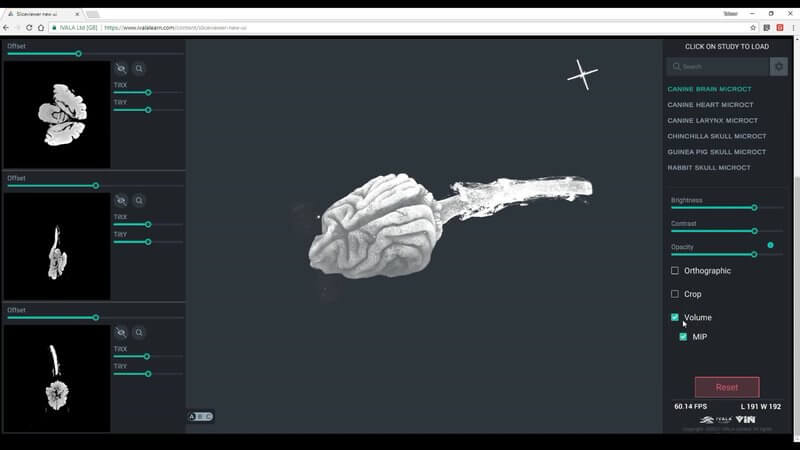
If you've used an imaging viewer before, this will feel familiar. Our first studies are microCT, scanned at very fine resolution, and you get three sections: transverse, sagittal and coronal. Scroll through them with the mouse wheel or the slider (keyboard controls were on the way when we recorded this), use the right mouse button to zoom in and out, and hit the magnify icon to open a slice on screen at much higher resolution.
2D slices linked to 3D space
In the middle of the screen is a 3D view. Move a slice in the 2D view and you'll see that slice move in 3D space too, so you always know where you are. You can hide individual slices to look at just one, then bring another back (say, the sagittal) to see how they relate.
Brightness, contrast and tilted planes
Hold the left mouse button and drag left to right to change contrast, or up and down to change brightness, so you can focus on different areas of the image. There are sliders for the same thing, and reset puts everything back. You can collapse the 2D panels to give the 3D view more room, move a slice dorsally and ventrally, and use two extra sliders to tilt the slice, so you can effectively cut the canine brain in any plane you like.
Studies available at launch
Load studies from the panel on the right. At launch we had microCT studies of the canine heart, brain and larynx, plus the skulls of the chinchilla, guinea pig and rabbit, with plans to add more, including more traditional MRI and CT studies.
Volume rendering, MIP and cropping
Click the volume icon and the viewer renders your 2D data in three dimensions. Switch on maximum intensity projection, raise the opacity and re-enable a slice to see it cut through the 3D object, which helps you reconstruct structures in your head. The crop tool lets you cut through the 3D rendering too: in the heart we can see both the left and right ventricles.
What you'll need
- Chrome or Firefox only.
- A modern graphics card. On older devices you may not be able to run the project at all, or it may run without the volume rendering. We hope to improve this over time.
As always, we'd love to hear what you think, good or bad.
Explore more
FREE for veterinary students, interns, residents & academics at vin.com. Also available by subscription at ivalalearn.com
Want to understand more about the options for accessing the content? Our company FAQs have the answers here pricing, account access and billing.