Test Yourself Mode: Name Structures in 3D
Test Yourself mode came straight out of some of the very earliest feedback you gave us. It lets you test yourself directly within the 3D content: rather than clicking a structure and reading about it, you click a structure and have to name it. Great for exam prep. 📝
How it works
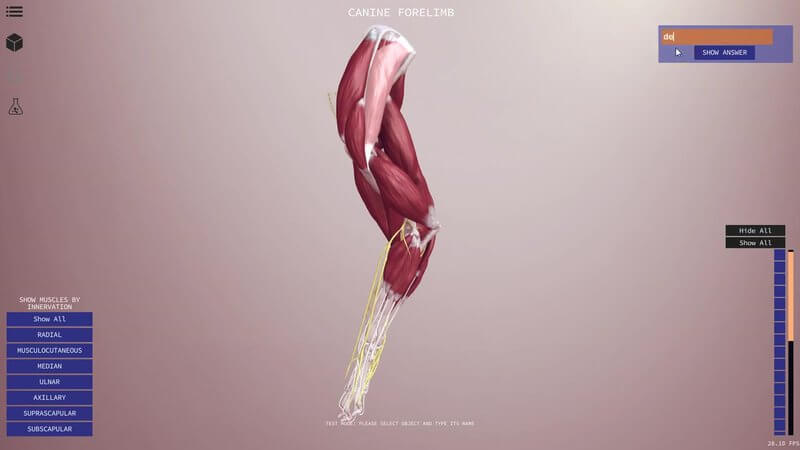
Normally, clicking a muscle in the scene brings up information about it in the box on the right. Switch to Test Yourself using its icon and two things change: all the names disappear from the menu, and clicking a muscle gives you a box to type your answer instead.
Instant marking
Type your answer and press Enter. In the video we try subscapularis (wrong) and then supraspinatus (right), then move on to the deltoid. Once you've got a structure right, its name appears in the list on the right, so you can see your progress.
Peel back the layers
After a correct answer, press the H key to hide that mesh and get to the one underneath. That's how we get down to the infraspinatus, then hide it again and keep going.
Lots of right answers
Many structures have more than one correct name, and our system accepts multiple correct answers. For the lateral head of the triceps, for instance, "triceps, lateral head", "lateral head triceps" and even "lat head triceps" all count.
Tell us what you think
The basic functionality is there and working, and we already have some improvements planned, so please give it a go and send us your feedback.
Explore more
FREE for veterinary students, interns, residents & academics at vin.com. Also available by subscription at ivalalearn.com
Want to understand more about the options for accessing the content? Our company FAQs have the answers here pricing, account access and billing.