Veterinary Anatomy MCQs: Courses and 3D Tests
No doubt you're familiar with multiple choice questions (MCQs), the dreaded examination technique. The good news is that with our system the only person examining you is you. 😅 We've built MCQs in two places: as question courses in our library, and as auto-generated tests inside our 3D content. Both are about testing your knowledge, spotting gaps and learning through repetition and the odd mistake.
MCQ courses with instant feedback
Each question has a stem followed by possible answers, and your job is to pick the right one. Some questions show an image with a highlighted bit of anatomy, others are text only (for example, which term describes towards or near the belly - ventral). Pick a wrong answer and the system shows you the correct answer straight away, with instant feedback that gives you more anatomical information about the right answer and why yours was wrong.
A few handy extras:
- Use the exclamation mark to report any problem with a question.
- Fed up with the sound telling you if you're right or wrong? Toggle it off.
Essential, good to know and sub-regions
When we launched, the courses covered the canine forelimb and canine hindlimb, focused primarily on anatomy, with the aim of completing the whole dog and with the head and neck already in progress. Within a course, anatomical landmarks are split into essential and good to know: the idea is to work through the essentials first, though you can tackle them in any order you like and reset your progress whenever you want. Courses are also divided into sub-regions as you go down the limb, so you can focus on just one area.
Build your own MCQ course
Because every question is tagged, you can create custom courses, just like custom flashcard decks. For example, you could choose the canine and only show questions tagged with the brachial region and the manus, give your course a name and it appears in your personal library, just for you.
Auto-generated MCQs inside the 3D content
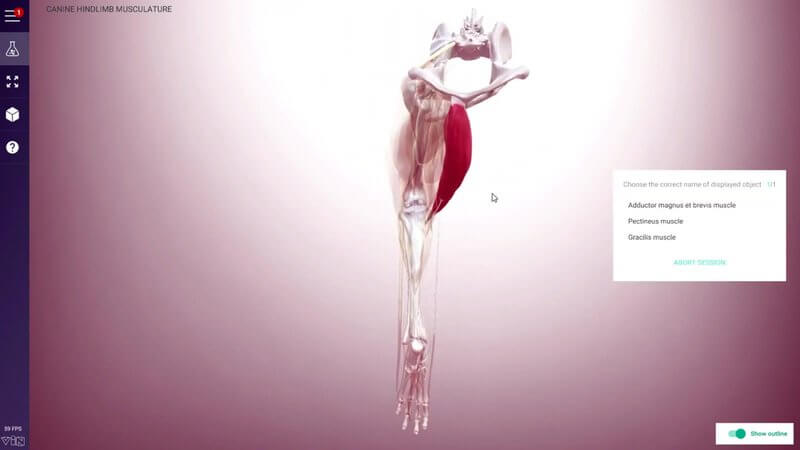
We've also updated the testing system in our 3D content so you can auto-generate a list of MCQs on the anatomy in the scene. You'll find Multiple choice test in the menu, just above the flask icon. Before you start, you choose:
- Terminology: clinical terms only, Latin (NAV) terms only, or a mix of both
- Difficulty: the number of options per question (fewer options is a little easier)
- Length: how many questions in the session, or non-stop for question after question
Each question shows a single object in the scene and asks what it is. In the video we work through structures like the gracilis, femoral nerve and superficial digital flexor (or, in Latin terminology, m. flexor digitorum superficialis). Isolated structures can be hard to recognise, so you can switch on an outline to give you more topographical context.
Results, repeats and Type Yourself
At the end, show results tells you how many you got right. You can repeat just the questions you failed, rerun the test with the same parameters (you'll get different questions), or go back and change the settings.
The original typed test is still there, now renamed Type Yourself, and it's been improved too: you can now see the other acceptable answers for a structure. We actually accept more than we display, as we allow some shortcuts and spelling variations.
Explore more
On VIN, the MCQs sit in the Student Center alongside the flashcards. FAQs live at support and FAQs.
FREE for veterinary students, interns, residents & academics at vin.com. Also available by subscription at ivalalearn.com
Want to understand more about the options for accessing the content? Our company FAQs have the answers here pricing, account access and billing.