Canine Echo Simulator: Control the Probe With Your Phone
Ever wondered why a slice through the heart in one direction gives you a completely different picture from a slice in another? 🫀 This proof of concept lets you explore exactly that, using a canine heart extracted from a CT scan and either your keyboard or your mobile phone.
Slice the heart in any direction
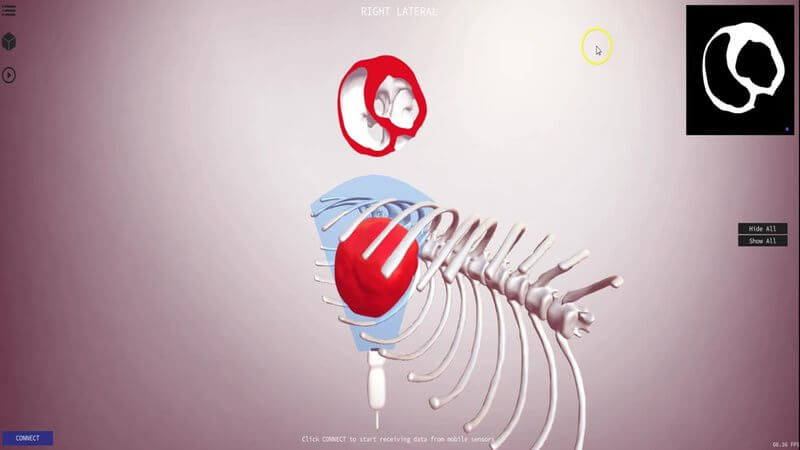
Using the keyboard, you can move the probe and slice through the heart in any direction you choose. This creates a section through the heart, and also gives you a 2D picture in the top right corner, like the one you'd see on an echo or ultrasound screen.
From 3D anatomy to the 2D echo image
The point of the project is to help you understand why different sections through the three-dimensional heart give you the different pictures they do on a two-dimensional ultrasound screen. That link between the 3D heart and the 2D image is one of the hardest parts of learning echocardiography.
Use your phone as the probe
We took it a step further and made it possible to connect your mobile phone and use its sensor data to control the probe on screen. The idea is to start building the muscle memory involved in obtaining the different views you're trying to achieve when performing an echocardiogram. When we released it, connecting your phone took no more than 15 seconds, with no wires and nothing to download.
A proof of concept
This was very much a proof of concept, released to our beta users at the time because we didn't see a reason not to let you play with it straight away. The simulator has moved on a lot since; you can read about a later version in our post on the canine echo simulator update.
Explore more
FREE for veterinary students, interns, residents & academics at vin.com. Also available by subscription at ivalalearn.com
Want to understand more about the options for accessing the content? Our company FAQs have the answers here pricing, account access and billing.